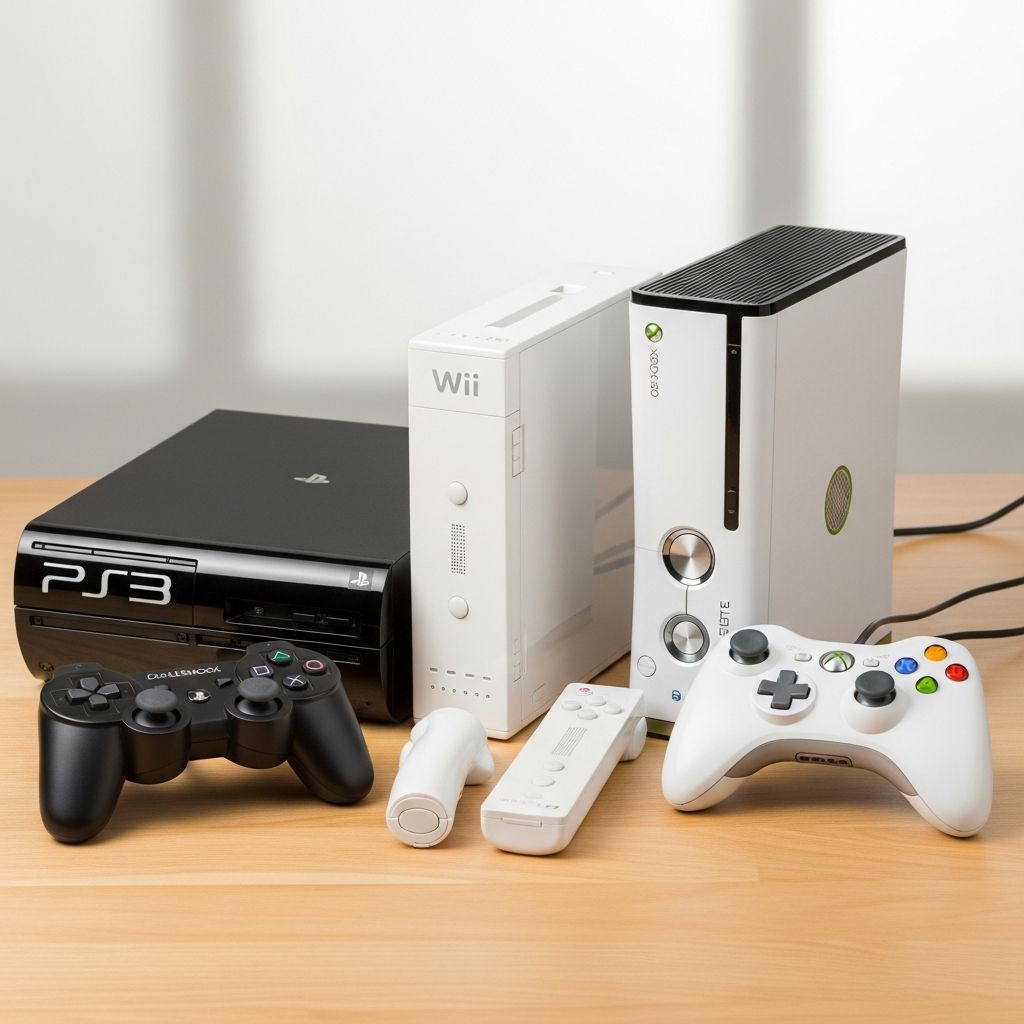
Older consoles like the PlayStation 3, Nintendo Wii, and Xbox 360 may be from a previous generation, but they still offer affordable, family-friendly gaming that can fit a wide range of ages and interests.
Why Classic Consoles Still Matter for Families
While new gaming systems get most of the attention, many families are discovering that previous-generation consoles provide plenty of fun at a much lower cost. These systems have large game libraries, simple parental controls, and hardware that is usually inexpensive on the used market. For many homes, they are more than enough for casual, party, or family-night gaming.
Choosing between the PS3, Wii, and Xbox 360 is less about raw technical power and more about what kinds of games your family enjoys, how active you want to be while playing, and whether online features are important to you.
At a Glance: Who Each System Suits Best
Before looking at details, it helps to understand the basic personality of each console. Think of them as three different types of entertainment centers, each with a slightly different audience and style of play.
| Console | Best For | Typical Family Use |
|---|---|---|
| PlayStation 3 (PS3) | Older kids, teens, and parents who like cinematic, story-driven, or visually detailed games. | Movie player plus gaming machine for teens and adults, with more mature titles and deep single-player experiences. |
| Nintendo Wii | Younger children, mixed-age groups, and families who want physical, motion-based party games. | Living-room multiplayer, group play, and light exercise games that grandparents can join with minimal learning. |
| Xbox 360 | Teens who enjoy competitive action games, sports titles, and online play with friends. | Shared console for older kids who like competitive or cooperative games, often used with online features and downloadable content. |
None of these consoles is universally “best”; the right choice depends on your family’s ages, interests, and how much structure you want to put around game time.
Understanding the Different Play Styles
Each console encourages a slightly different way of interacting with games. Knowing how you want your family to play can quickly narrow your options.
Active Motion Play vs. Couch Play
- Nintendo Wii: Designed around motion controls, where players swing, tilt, or point the controller to bowl, dance, or swing a virtual tennis racket. This makes the system excellent for party games and family gatherings.
- PlayStation 3 and Xbox 360: Primarily use traditional gamepads with buttons and analog sticks, which suit detailed action, sports, and adventure games. Optional camera or motion accessories exist, but they are secondary rather than central to the experience.
If you want kids (and adults) off the couch and moving, the Wii usually comes out ahead. If your older children care more about complex controls and sophisticated gameplay depth, the PS3 or Xbox 360 will feel more natural.
Solo Adventures vs. Group Experiences
- PS3: Well suited to single-player adventures, role-playing games, and long story campaigns that one person plays at a time.
- Wii: Optimized for local multiplayer, so multiple people can play together in the same room, often taking turns or playing at once.
- Xbox 360: Balances solo and multiplayer, with strong support for competitive and cooperative modes both locally and online.
Families who picture everyone in front of the TV laughing together may lean toward the Wii, while those whose teens want long, immersive games may prefer the PS3 or Xbox 360.
Game Libraries: What Will Your Family Actually Play?
The most important question is simple: What games does your family want to play? Hardware features matter far less than the library of titles available for each system.
PlayStation 3 Game Focus
The PS3 library leans toward cinematic action adventures, detailed role-playing games, sports titles, and visually impressive exclusives. Many of its most famous series are rated for teens or adults, which can be a draw for older players but a concern for younger kids.
- Strong selection of deep, story-driven games that can keep older players occupied for weeks.
- Good variety of sports, racing, and fighting games that appeal to competitive teens.
- Relatively fewer simple, young-child-focused titles compared with the Wii.
Nintendo Wii Game Focus
The Wii is known for colorful, friendly-looking games built around motion controls. Many popular series on this system are appropriate for children, but still fun for adults, especially in a group setting.
- Abundance of party games, mini-game collections, and family-friendly sports titles.
- Plenty of platformers and adventure games with accessible mechanics and simple controls.
- Fewer graphically intense, realistic shooters or gritty action games than the other two consoles.
Xbox 360 Game Focus
The Xbox 360 has a reputation for fast-paced action, shooters, and competitive online games, but its library is diverse enough to include family-friendly, sports, and racing titles as well.
- Large catalog of games that emphasize accuracy, reflexes, and teamwork, especially in online multiplayer.
- Strong sports and racing line-up that can appeal to both teens and adults.
- Some family-friendly options, though parents may need to look more carefully at age ratings and content descriptions.
Controllers and Ease of Use for Different Ages
Controlling a game can be the biggest barrier for very young children, grandparents, or adults who have never played before. How natural the controller feels can determine whether the console becomes a daily fixture or gathers dust.
Nintendo Wii Controllers
The Wii remote is shaped somewhat like a TV remote, and many games use simple gestures such as swinging or pointing instead of requiring complex button combinations.
- Easy for first-time players to pick up, especially for bowling, tennis, and other motion-based games.
- Some games add an extra controller attachment, but most family titles keep input simple.
- Works well in crowded living rooms since people directly translate real-world motions into on-screen actions.
PS3 and Xbox 360 Controllers
Both systems use traditional dual-stick controllers with triggers and several face buttons. This layout is excellent for precision and complex games, but it can feel intimidating at first.
- Well suited to older kids and experienced players who have used similar controllers before.
- Provide more precise control for aiming, driving, and exploring complex game worlds.
- May require time and patience when introducing very young children or non-gamer adults.
Online Features, Media Playback, and Extra Uses
Because these consoles were designed as multimedia hubs, they do more than just play discs. However, their modern usefulness varies depending on what your family wants.
PlayStation 3 as a Media Hub
The PS3 includes a built-in high-definition movie drive, making it useful as a disc player as well as a gaming machine. In many homes this dual purpose made it a central living-room device.
- Can play high-definition movie discs and standard DVDs.
- Offers local media playback from storage devices for supported formats.
- Online services vary by region and may be limited today compared with current-generation systems.
Xbox 360 and Online Play
The Xbox 360 was built around an online network where players can compete, chat, and download games. Subscriptions and safety settings can be important considerations for parents.
- Strong support for online multiplayer, downloadable games, and additional content.
- Voice chat and online interactions require careful setup of privacy and parental controls.
- Some features depend on subscription tiers that may or may not still be relevant in your region.
Nintendo Wii’s Extra Features
The Wii originally supported a variety of channels for basic web browsing, weather, and downloadable games, but its main strength has always been local play. For most families today, the system functions primarily as a game console rather than a modern media center.
Parental Controls, Safety, and Screen Time
All three consoles include tools that allow adults to limit game content and, in some cases, restrict certain features such as online chat or purchases. Understanding these settings can make gaming far safer and more manageable for children.
- Content ratings: You can usually set a maximum allowed rating so that games marked for older audiences will not run without a password.
- Online access: Systems with network features allow parents to limit or fully block online interactions, reducing exposure to strangers or unmoderated voice chat.
- Purchase restrictions: On consoles that support buying downloadable games, parents can often require a passcode to spend money or download new content.
Even with these tools, it remains important to set household rules: where the console lives, what times it can be used, and whether gameplay is a privilege tied to homework or chores.
Budget, Used Hardware, and Practical Considerations
Since these consoles are no longer the latest generation, most families will be buying them secondhand. That can be a great way to save money, but it also introduces practical concerns.
Cost and Availability
- Older consoles and games are often much cheaper than current systems, especially if you buy locally or refurbished.
- Some rare or highly sought-after games may still be expensive, so check prices for specific titles your family wants.
- Accessories such as extra controllers and motion sensors may be harder to find in good condition.
Space, Setup, and Noise
Each console has different physical demands. Some require standing, swinging, or clearing floor space, while others stay mostly on the shelf with players seated.
- Wii: Needs enough space for players to move their arms freely without hitting furniture or other people.
- PS3 and Xbox 360: Typically played while seated, though camera or motion add-ons can require some space in front of the TV.
- All three: Benefit from ventilation room and careful placement to reduce overheating and fan noise.
Which Console Should Your Family Choose?
The best way to decide is to match each console’s strengths to your family’s habits, ages, and interests. The following quick guide can help you narrow down your choice based on a few simple questions.
Pick the Wii If…
- You want everyone—from small children to grandparents—to be able to join in with minimal explanation.
- Your idea of game night involves lots of laughter, light competition, and movement-based activities.
- You care more about group fun than cutting-edge graphics or complex storylines.
Pick the PS3 If…
- You have older children or adults who enjoy long, story-heavy adventures or visually rich action games.
- You like the idea of combining a game console with a high-definition movie player in one device.
- You want access to a deep catalog of single-player titles and more mature experiences.
Pick the Xbox 360 If…
- Your teens are excited about competitive gaming, sports titles, and teaming up with friends.
- Online play and downloadable games are important features in your home.
- You want a broad mix of action-packed and sports-oriented experiences for older kids and adults.
Frequently Asked Questions (FAQ)
Is it still worth buying one of these older consoles today?
Yes, for many families these systems remain a cost-effective way to access hundreds of enjoyable games without investing in the latest hardware. They are particularly attractive for casual players, younger children, or households that do not need cutting-edge visuals.
Which console is best for very young children?
The Wii is often easiest for young kids thanks to its motion-based controls and large library of family-friendly games. The simple actions of swinging, pointing, and tilting can be more intuitive than managing dual sticks and multiple buttons.
What if my children mainly care about sports games and racing?
Both the PS3 and Xbox 360 have strong sports and racing catalogs, with the Xbox 360 particularly known for fast-paced competitive titles. The Wii also has sports games, though they tend to be more arcade-like and motion-driven than realistic simulations.
Do I need an internet connection for these consoles?
All three can play physical game discs without an internet connection. However, online access is required for features such as multiplayer over the network, downloading digital games, or updating certain titles where updates are still supported.
How can I keep my child safe if they play online?
Use the console’s parental controls to restrict online interactions, disable voice chat where appropriate, and limit or block purchases. It also helps to keep the system in a shared living space so you can monitor play and talk openly about safe behavior online.