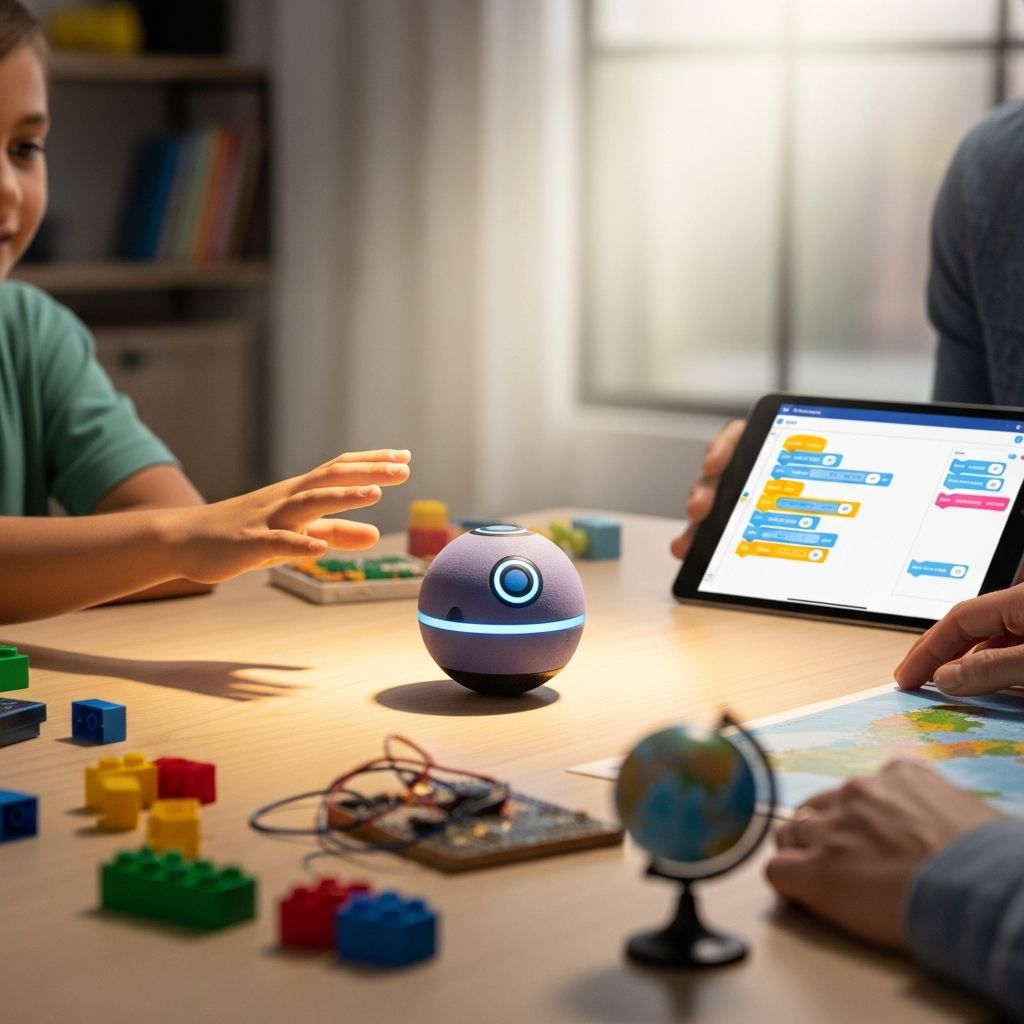
The Sphero robotic ball looks like a simple glowing sphere, but in practice it is a compact robot, a game system, and a beginner-friendly coding lab all rolled into one device. It is designed to be controlled by a smartphone or tablet, encouraging kids and adults to move, experiment, and think creatively instead of just tapping on a screen.
For families trying to balance entertainment with education, a connected toy like this can be a useful bridge: children see it as a playful gadget, while parents know it quietly reinforces logic, problem-solving, and basic programming concepts.
What Exactly Is Sphero?
At its core, Sphero is a motorized ball with an internal drive system, sensors, and wireless connectivity, wrapped inside a durable plastic shell. When paired with a mobile device, it can roll, spin, change direction, and glow in different colors on command.
The ball communicates via Bluetooth with an app, which acts as the remote control and programming interface. Through various official and third-party apps, users can drive the ball manually, guide it through mazes, trigger light patterns, or write simple code to choreograph routines.
Key Capabilities in Plain Language
- Remote control play: Use an on-screen joystick or tilt controls to steer Sphero around the room.
- Programmable behavior: Create basic code sequences so Sphero can move, flash, and react on its own.
- Interactive sensors: Built-in sensors track speed, direction, and impacts, allowing responsive games.
- Multi-platform apps: Different apps focus on driving, games, or STEM learning, so it grows with the child.
Design and Durability for Real Homes
Parents often judge a toy less by its packaging and more by how it survives the first week. The Sphero ball is engineered with a solid, impact-resistant outer shell designed to cope with bumps into furniture, collisions with table legs, and the occasional tumble.
Many models feature a smooth waterproof housing, which means it can handle spills and light splashes. In practice, that durability gives kids permission to experiment more freely, while adults can relax a bit about accidental crashes.
How the Hardware Helps Play
- Hard plastic shell: Tough enough for typical indoor floors and moderate outdoor use.
- Internal gyroscope and accelerometer: Help the ball keep track of its orientation and motion.
- LED lighting: Multi-color lights inside the shell make the robot visually engaging, especially in low light.
- Wireless charging base: Many versions charge on a cradle instead of plugging directly into the ball.
Setup: From Box to First Roll
Getting started usually requires three main steps: charging the ball, installing an app, and pairing the device. Families who are comfortable downloading apps will likely find the process straightforward.
Before handing it to kids, parents may want to experiment for a few minutes to get a feel for steering and aiming. Because the ball’s internal “front” is not visible, most apps include a calibration routine that aligns the robot’s sense of direction with the user.
Basic Setup Steps
- Charge: Place Sphero on its charging base or connect it to power and wait for it to reach a full charge.
- Install the app: Download the recommended Sphero app for your platform from the relevant app store.
- Pair via Bluetooth: Turn on Bluetooth on your phone or tablet, wake the ball, and connect through the app.
- Calibrate: Follow on-screen instructions to aim Sphero so forward on the screen matches forward on the floor.
- Test drive: Try simple forward, backward, and turning movements before inviting kids to take over.
How Kids Actually Use It
In real family life, Sphero tends to migrate between roles: sometimes it is a remote-controlled toy zooming down hallways, sometimes it is part of a homemade obstacle course, and other times it is a quiet coding project on a rainy afternoon. That flexibility helps keep it from becoming a short-lived novelty.
Children often begin with free play, simply driving the ball and exploring basic features. Over time, curious users may open the programming tools and experiment with routines like “roll forward, change color, pause, then spin.” These small experiments build confidence without formal lessons.
Popular Play Ideas at Home
- Indoor races: Set start and finish lines with tape and let kids race Sphero against each other.
- Maze missions: Create cardboard or masking tape mazes on the floor and try to navigate them precisely.
- Color challenges: Assign each family member a color and let Sphero “choose” turns by lighting up.
- Story mode: Have children write a short story and program Sphero to act out key moments with motions and lights.
STEM Learning Without Feeling Like Homework
One of the main appeals of Sphero is the way it introduces STEM skills by wrapping them in play. Kids learn that changing a small part of a program can lead to a visibly different movement on the floor, which is a powerful, concrete example of cause and effect.
The coding interfaces used by Sphero apps are usually visual, block-based systems that hide complex syntax. Children drag and drop commands like “roll,” “change color,” and “wait,” then adjust numbers such as speed, duration, and angle.
Skills Children Can Build
- Logical sequencing: Arranging actions in the right order to achieve a goal.
- Debugging mindset: Testing a program, noticing what went wrong, and adjusting the code.
- Spatial reasoning: Understanding angles, distances, and timing to navigate real-world space.
- Creative problem-solving: Designing original games or challenges and adjusting rules as needed.
Family Interaction: More Than Another Screen
Because Sphero moves in physical space, it naturally encourages kids to get up from the couch. Parents can use that to their advantage by turning solo screen time into family game time centered around a shared gadget.
Adults do not need to be coding experts to participate. Simply helping younger children think through instructions—such as estimating how far the ball should roll or how much to turn—encourages conversation about numbers and strategies.
Ways Parents Can Join In
- Co-design challenges: Brainstorm obstacle courses or mini-games together and test them as a team.
- Rotate roles: Let one child drive while another gives verbal directions, then switch.
- Reflection breaks: Ask kids what they would change in their code after each attempt.
- House rules: Agree on safe play zones to protect breakable items and pets.
Indoor vs. Outdoor Play
Sphero can work in both indoor and outdoor settings, but performance depends heavily on the surface. Smooth floors like hardwood, tile, or low-pile carpet are usually ideal for precise control and coding accuracy.
Outdoors, the ball can handle solid surfaces such as concrete patios or driveways. Thick grass, loose gravel, or muddy areas are less suitable and may slow the ball significantly or affect battery life.
Best Surfaces for Sphero
| Surface Type | Experience Level | Recommended Use |
|---|---|---|
| Smooth hardwood or tile | Very beginner-friendly | Great for learning controls and trying code-based navigation. |
| Low-pile carpet | Beginner to intermediate | Slows the ball slightly, which can help younger drivers. |
| Concrete patio or driveway | Intermediate | Fun for longer runs and outdoor races in dry conditions. |
| Thick carpet or tall grass | Advanced | Not ideal; may cause stalls and reduce responsiveness. |
Battery Life, Charging, and Practical Details
Battery life varies by model and usage, but most versions offer around an hour of active rolling on a full charge. Frequent use at maximum speed or on difficult surfaces can shorten that playtime, so sessions may naturally divide into shorter bursts.
Charging typically involves placing the ball on a cradle or stand connected to a power source. Many families get into the habit of recharging after each play session so the toy is ready for next time.
Tips to Maximize Playtime
- Encourage kids to plan and test short programs instead of continuous high-speed driving.
- Keep the charging base in a consistent, accessible spot so recharging is easy to remember.
- Use calmer light shows and lower speeds when experimenting with code to conserve energy.
Age Range and Learning Curve
Sphero is marketed to children approximately eight years old and up, though younger kids may also enjoy it with supervision. Very young children often focus on steering and watching the lights, while older kids gravitate toward coding tools and more complex challenges.
The biggest learning curve is usually not the app interface but the mental shift of translating on-screen commands into real-world motion. After a few sessions, most kids develop an intuitive sense of angles, timing, and speed adjustments.
Which Kids Enjoy It Most?
- Children who like building, tinkering, or solving puzzles.
- Kids who already enjoy video games but might benefit from more physical, off-screen interaction.
- Students interested in robotics, engineering, or animation-style storytelling.
- Learners who thrive on trial-and-error experimentation rather than rigid instructions.
Pros and Cons for Families
Like any connected toy, Sphero has its strengths and trade-offs. Weighing these points can help families decide whether it fits their budget, space, and children’s interests.
The following table summarizes some key advantages and potential drawbacks from a family perspective.
| Aspect | Strengths | Limitations |
|---|---|---|
| Educational value | Encourages coding, critical thinking, and problem-solving. | Learning benefits depend on consistent, intentional use. |
| Engagement | Visually appealing and highly interactive; appeals to a wide age range. | Some kids may treat it purely as a remote-control toy and ignore coding features. |
| Durability | Sturdy shell handles typical bumps and indoor use. | Not invincible; repeated drops on stairs or rough outdoor terrain may cause wear. |
| Cost | Long-term use across ages can justify the investment. | Higher price than many basic toys, especially if used only occasionally. |
| Setup and tech needs | Simple pairing for families already comfortable with mobile devices. | Requires a compatible smartphone or tablet and regular charging. |
Tips for Getting the Most Out of Sphero
To keep Sphero from becoming another forgotten gadget, it helps to integrate it into regular routines and to layer in small challenges over time. Treat it more like a creative tool than a toy that is either “fun” or “not fun.”
Parents can gently nudge kids toward learning goals by setting simple missions, rewarding persistence, and occasionally joining in the experimentation themselves.
Practical Suggestions
- Schedule a short weekly “robot time” where kids can explore new apps or coding features.
- Rotate themes, such as “maze week,” “story week,” or “science week,” and design challenges around them.
- Encourage children to document their favorite programs in a notebook or digital file, including what worked and what did not.
- Use Sphero to support school topics, such as measuring distances, angles, or time during math units.
Is Sphero Right for Your Family?
The Sphero robotic ball suits households that value technology and want toys that stretch beyond passive entertainment. It works especially well for children who like experimenting, building, or understanding how things work under the surface.
Families looking for a fully offline toy, or those without a compatible mobile device, may find it less practical. For everyone else, it can be an engaging introduction to robotics that stays relevant as kids grow from simple driving games into more sophisticated coding experiments.
Frequently Asked Questions
Do you need a specific type of phone or tablet?
Sphero typically connects to a smartphone or tablet via Bluetooth, so you need a reasonably modern device that supports the current app versions. Checking compatibility in the app store listing before purchasing is always wise, especially if your household relies on older hardware.
Is Sphero safe around pets and younger siblings?
The ball’s smooth surface and rounded shape make it generally safe, but supervision is important. Some pets may chase or paw at it, and very young children may be tempted to throw it, so establishing clear rules for where and how it can be used is essential.
How messy can the play environment be?
Sphero is usually designed to handle typical household dust and minor spills, and some models offer water resistance. That said, using it in muddy, sandy, or gritty environments can increase wear and may affect performance, so cleaner surfaces are strongly recommended.
Can more than one child share a single Sphero?
Yes, families often share one robot by taking turns driving or programming. Cooperative challenges, such as building a maze together or timing how fast each person can complete the same course, help keep the experience fair and social.
Will kids lose interest quickly?
Interest levels vary, but long-term engagement tends to be higher when adults periodically introduce new challenges, apps, or goals. Treating Sphero as a flexible platform—rather than a one-purpose toy—helps it remain interesting as children’s skills advance.