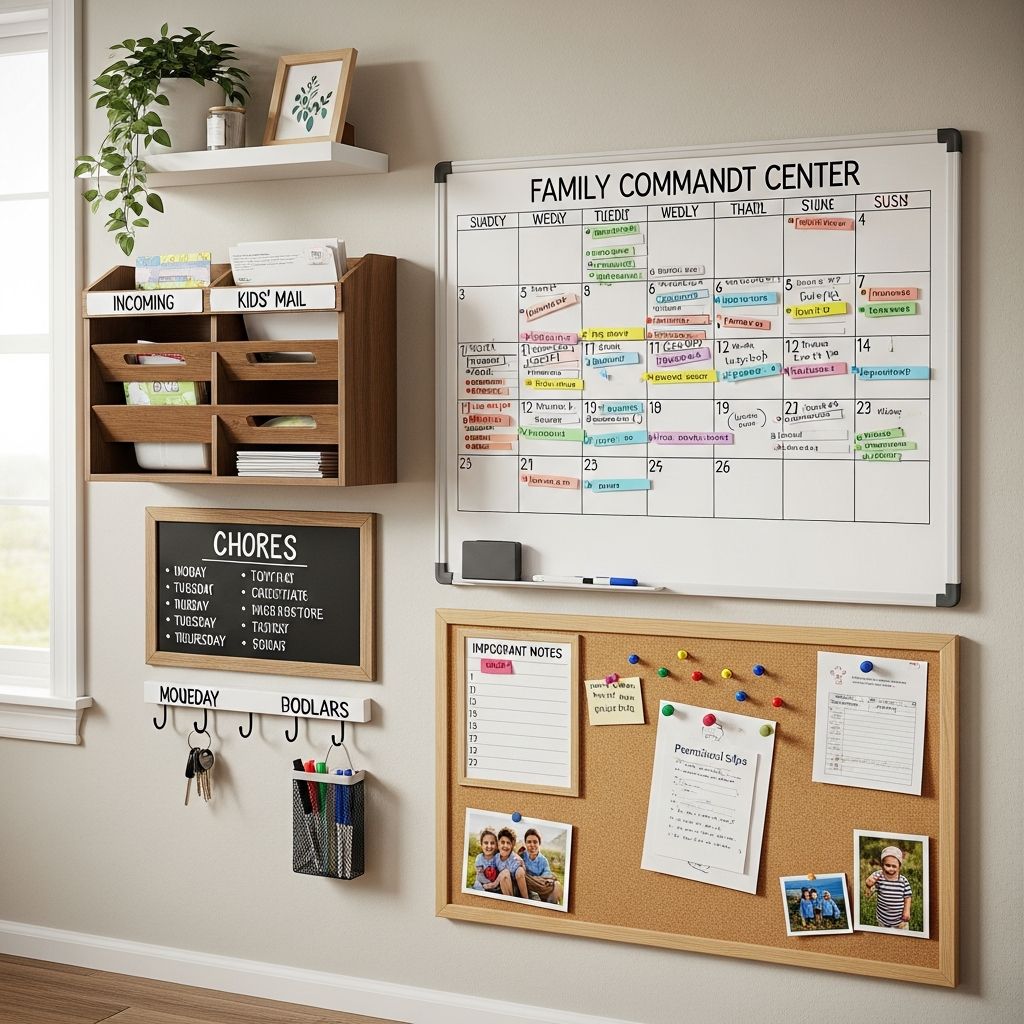
When everyone knows what to do and where to be, home life becomes calmer, more cooperative, and a lot less stressful. A well-designed family command center — combining a chore system with a shared calendar — can give your household that clarity.
This guide walks you through why a home hub works, how to set it up step-by-step, and ways to adapt it for your unique family. The goal is not perfection; it is a system your family will genuinely use.
Why Combine Chores and a Family Calendar?
Chores and schedules are usually handled separately: tasks on one list, events on another, and random reminders floating in your head. A command center brings everything into one visual place so your family sees responsibilities and time commitments together.
Placing chores and the calendar side by side helps kids understand that tasks are part of the rhythm of family life, just like school, practices, and birthdays. They begin to see their work at home as a meaningful contribution instead of a random interruption.
Key Benefits for Your Family
- Less nagging because expectations are posted in a clear, consistent format.
- Fewer forgotten tasks and appointments thanks to one visible home hub.
- Improved independence as kids check the board instead of asking what to do next.
- More teamwork when everyone can see that the workload and schedule are shared.
- Better time awareness for children as they connect chores with days, times, and routines.
Planning Your Family Command Center
Before buying supplies, spend a few minutes clarifying how you want the system to work. This prevents you from creating a beautiful board that nobody actually uses.
Questions to Answer First
- Where will it live? Choose a high-traffic spot: kitchen, hallway near bedrooms, or by the main door.
- Who will use it? Consider ages, reading levels, and attention spans of each child.
- How detailed should it be? Decide if you want daily, weekly, and/or monthly views.
- How much maintenance can you handle? A simpler board that gets updated will always beat an elaborate one that doesn’t.
Core Elements to Include
| Element | Purpose | Tips |
|---|---|---|
| Family Calendar | Shows events, appointments, practices, and special days. | Use a monthly layout with room to write; color-code by family member. |
| Chore Area | Lists tasks and who is responsible for each one. | Keep it visual; use columns, icons, or checkboxes for easy scanning. |
| Notes / Reminders | Catches things that don’t fit in chores or calendar. | Great for meal themes, shopping notes, or weekly priorities. |
| Motivation Space | Makes the board feel positive, not like a wall of demands. | Add a small space for praises, goal tracking, or progress stickers. |
Step-by-Step: Setting Up Your Board
You can build a command center with items you already have (like poster board and tape) or with reusable tools (like a whiteboard and magnets). The exact materials are less important than keeping the layout clean and readable.
Step 1: Select Your Surface
Pick a base that fits your wall and your budget. Larger families usually benefit from a bigger surface so no one is squinting to see their name.
- Whiteboard: Easy to change, ideal if your schedule shifts often.
- Cork board: Works well with index cards, printed calendars, and pinned chore cards.
- Magnetic board: Great for movable chores and rearranging responsibilities.
- Poster board or foam board: Budget-friendly and customizable, even if not reusable.
Step 2: Map Out the Sections
Use washi tape, marker lines, or thin strips of colored paper to divide your board. Aim for clear, simple zones instead of overstuffing every corner.
- Reserve the top half or left side for the family calendar.
- Create a dedicated chore zone with columns for each person or each day.
- Add a smaller corner for notes and encouragement.
Step 3: Design the Family Calendar
Draw or attach a monthly grid with boxes large enough for quick notes. If you prefer, you can show only one or two weeks at a time but give each day more space.
- Choose a color for each family member (marker, sticker, or highlighter).
- Mark recurring events first: school, activities, lessons, regular work shifts.
- Add appointments and special dates next: birthdays, visitors, school events.
Step 4: Build the Chore System
This is the heart of the command center. The structure should match how your family naturally thinks about tasks: by person, by room, or by day.
- By person: One column per family member with their tasks listed underneath.
- By day: One row per day of the week, with chores assigned within that row.
- By category: Sections like “Morning,” “After School,” and “Evening” routines.
Leave room for a simple way to show completion, such as checkboxes, stickers, or movable magnets.
Step 5: Add Finishing Touches
A command center is more inviting when it feels warm and personal rather than stern. Small details encourage kids to interact with it.
- Label each section clearly using large, friendly lettering.
- Include a small photo of each child next to their column if reading is a challenge.
- Add a mini “wins” area where you write quick shout-outs for effort and follow-through.
Assigning Age-Appropriate Chores
The most successful chore systems match tasks to a child’s abilities. When chores feel possible and meaningful, kids are far more likely to participate willingly.
Sample Chores by Age Range
| Age Range | Suggested Chores | Support Needed |
|---|---|---|
| 3–5 years |
| Short demos, pictures instead of words, lots of praise. |
| 6–8 years |
| Light supervision, visual reminders, clear simple steps. |
| 9–12 years |
| Occasional check-ins, involvement in choosing tasks. |
| Teens |
| Clear expectations, deadlines, and natural consequences. |
Balancing Fairness and Flexibility
Kids are often quick to notice if one sibling seems to have lighter chores. Aim for fairness, but remember that fairness does not always mean identical tasks for everyone.
- Give younger kids tasks that match their strength and attention span.
- Rotate the least popular chores weekly so no one feels stuck with them forever.
- Allow older kids some say in which responsibilities they take on in exchange for more privileges.
Motivation, Rewards, and Consequences
Chore systems work best when they combine routine expectations with genuine appreciation. Rewards can be helpful, but they should not overshadow the message that everyone contributes because they are part of the family.
Non-Monetary Reward Ideas
- Extra bedtime story or screen time for consistently completed chores.
- Choice of family movie, game, or dessert at the end of the week.
- Special responsibility or privilege, like choosing music in the car.
Simple Allowance Approaches
Some families connect specific chores to earnings, while others treat allowance as separate from basic responsibilities. Either approach can work if you are clear about the rules.
- Fixed weekly allowance with small bonuses for extra or above-and-beyond tasks.
- Point or token system that converts into money, outings, or saved goals.
- “Family jobs” that are required and unpaid alongside optional “extra jobs” that earn money.
Consequences That Teach, Not Shame
Missed chores are a chance to reinforce responsibility, not a reason to humiliate your child. Calm consistency will teach more than a lecture.
- Link chores to privileges: unfinished tasks may delay screen time or outings.
- Have kids make up missed chores at another time rather than excusing them entirely.
- Talk briefly about what got in the way and brainstorm small tweaks to the routine.
Keeping the System Going Long-Term
Many families start strong and then slowly stop updating the board. A few small habits will help the command center stay relevant and useful.
Weekly Check-In Ritual
Pick a consistent time once a week to gather briefly at the board. This can be five minutes on Sunday evenings or right after dinner one weeknight.
- Review the past week: celebrate what went well, notice patterns.
- Update the calendar with any new appointments or events.
- Rotate or adjust chores if needed and invite input from the kids.
Seasonal Adjustments
Sports seasons, holidays, and school breaks all change the rhythm of family life. Your chore and calendar system should evolve with those shifts.
- Add or remove tasks during busy school terms to prevent overload.
- Introduce special seasonal chores, like yard work or holiday prep.
- Update the look occasionally with new colors or small decorations to renew interest.
Common Problems and Practical Fixes
Even the best-designed command center will hit rough patches. Problems are not a sign that the idea has failed; they simply show what needs adjusting.
“My Kids Ignore the Board”
- Walk them through the board at the same time each day, at first, as part of a routine.
- Use visual markers (stickers, magnets, colored pens) that children actually enjoy using.
- Start with a very small number of tasks so the board feels achievable, not overwhelming.
“I’m Tired of Reminding Everyone”
- When someone asks what to do, calmly redirect them to check the board.
- Use a simple phrase like, “What does your list say?” instead of a long lecture.
- Consider setting alarms on a shared device for key times, labeled “Check the board.”
“Our Evenings Are Too Chaotic”
- Group small chores into short, timed “power sessions” right after dinner.
- Assign certain tasks to mornings or weekends instead of cramming everything into nights.
- Be realistic: reduce less-essential chores during exceptionally busy weeks.
Simple Variations for Different Families
No two households look alike, and your chore-calendar system does not have to mimic anyone else’s. Small changes can make the board feel tailored to your situation.
For Families with Very Young Kids
- Use photos or simple icons instead of written chore names whenever possible.
- Focus on routines like “Morning,” “After Preschool,” and “Bedtime” instead of long lists.
- Celebrate effort more than perfect execution to keep spirits high.
For Families with Teens
- Involve teens directly in choosing which tasks they will own.
- Post due dates and time windows rather than micromanaging exact moments.
- Connect chores to bigger goals, like saving for trips or car expenses.
For Blended or Co-Parenting Homes
- Include which home children will be at on the calendar if schedules vary.
- Keep core routines consistent, even if chore details are different in each home.
- Share photos of the board so both households can reference it when needed.
FAQs About Family Chore and Calendar Systems
How many chores are reasonable for my child?
Think in terms of time rather than number of tasks. For younger kids, aim for a few short chores that together take no more than 10–15 minutes a day. Older children can manage more, but balanced expectations will help prevent burnout and resistance.
Should chores be tied to allowance?
Both options can work. Some parents feel basic chores should be done simply because everyone lives in the home, using extra tasks for earning money. Others prefer a direct connection between chores and allowance. The most important part is to be consistent and clear about your family’s approach.
What if my child refuses to do chores?
Refusal is usually a signal of overwhelm, power struggle, or unclear expectations. Try simplifying the list, offering limited choices between tasks, and calmly following through with logical consequences, such as delayed privileges, instead of extended arguments.
How do I keep the calendar accurate?
Make updating the board part of your weekly rhythm. Place a pen or markers nearby and get in the habit of adding events as soon as you learn about them. During your weekly check-in, confirm that all major commitments are up to date.
Can digital tools replace a physical board?
Digital apps can be very helpful, especially for older kids and co-parenting households. Many families, however, still benefit from a large, visible board in a shared space because it does not depend on a device and everyone can see it instantly. You can also use both: a physical board as the hub and a digital calendar for reminders.
A family chore and calendar command center will not erase all chaos, but it can turn daily life from reactive and confusing into more predictable and shared. Start small, keep it visible, and adjust as you go. Over time, this simple tool can help your home feel more like a team effort and less like a daily scramble.